![[NEWEST VERSION] YANHUA Simulator Chip for 35160WT 35128 35128WT (incl. 5V NO.8 Pin)](/upload/pro/25061617501309946616.jpg)
![[NEWEST VERSION] YANHUA Simulator Chip for 35160WT 35128 35128WT (incl. 5V NO.8 Pin)](/upload/pro/25061617501309966169.jpg)
![[NEWEST VERSION] YANHUA Simulator Chip for 35160WT 35128 35128WT (incl. 5V NO.8 Pin)](/upload/pro/25061617501309982308.jpg)
![[NEWEST VERSION] YANHUA Simulator Chip for 35160WT 35128 35128WT (incl. 5V NO.8 Pin)](/upload/pro/25061617501310004032.jpg)
![[NEWEST VERSION] YANHUA Simulator Chip for 35160WT 35128 35128WT (incl. 5V NO.8 Pin)](/upload/pro/25061617501310035416.jpg)


[NEWEST VERSION] YANHUA Simulator Chip for 35160WT 35128 35128WT (incl. 5V NO.8 Pin)
Produktbeschreibung
YANHUA Simulator Chip for 35128WT, 35160WT (incl. 5V NO.8 Pin)
35128WT/35160WT Emulator
No risk. No red dot on odometer.
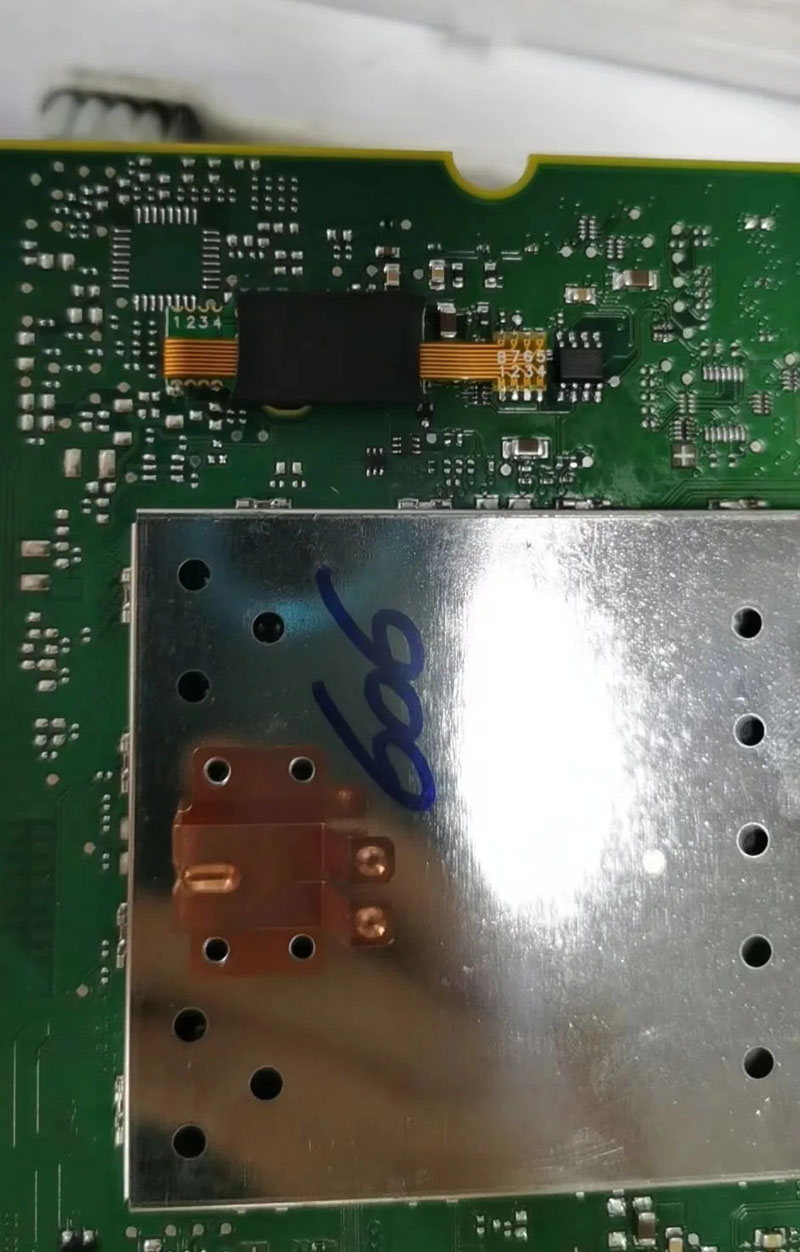
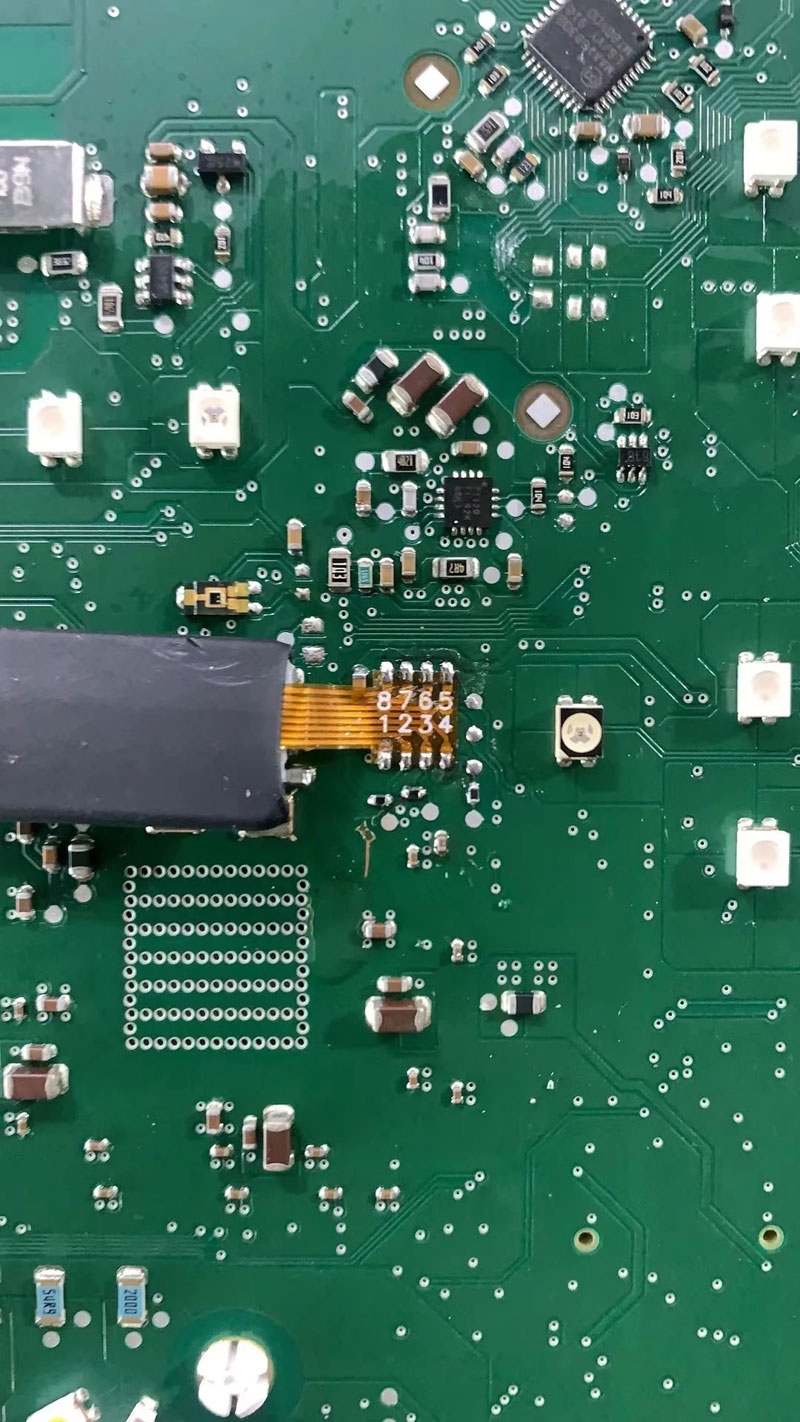
Support models: F chassis odometer with 35128WT and 35160WT chips dash, G chassis VDO odometer.
If it is a new car with G chassis, it is recommended that buy the old version of the chip.
What is the different of these two kinds of simulator chips?The small red color simulator chips is only for 35128WT dash
The Big one is compatible with both 35128WT and 35160WT dash
YH35XX Chip Clip Installation Instructions:
1: Confirm the position and pin definition of the original car chip welding plate, analog chip, compatible analog chip and YH35XX chip clip during installation.
2: Tilt the original car chip welding plate, analog chip or compatible analog chip at an angle of 45° and install it into the corresponding YH35XX chip clip from top to bottom.
3: Confirm that the original car chip welding plate, analog chip or compatible analog chip is firmly installed.
YH35XX Programmer + Simulator Instruction
1. Disassemble the original 35XX EEPROM from the cluster and solder it to the adaptor board.
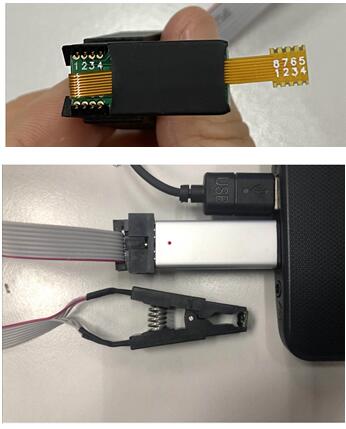
Then clamp the adaptor board with the solder-free clamp. Make sure the direction of the adaptor board and solder-free clamp is correct.
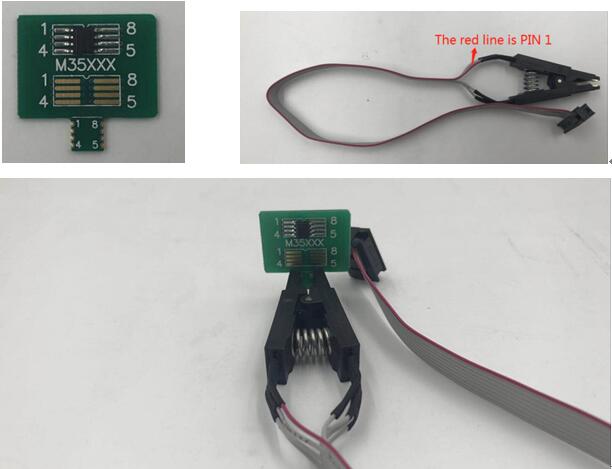
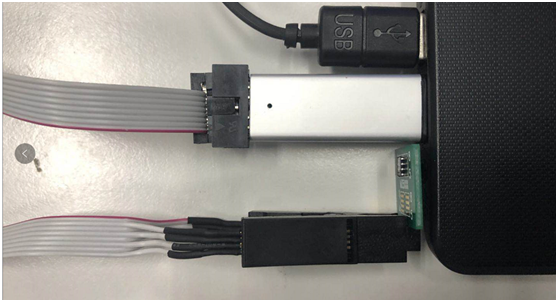
2. Plug the YH35XX programmer into the USB port of the PC, Click "computer" and it will recognize a usb flash drive named 35XX programmer.

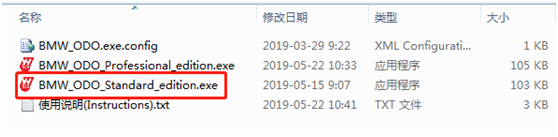
3. Click U disk 35XX programmer, Double-click "BMW_ODO_Standard_edition. exe" to open the software.
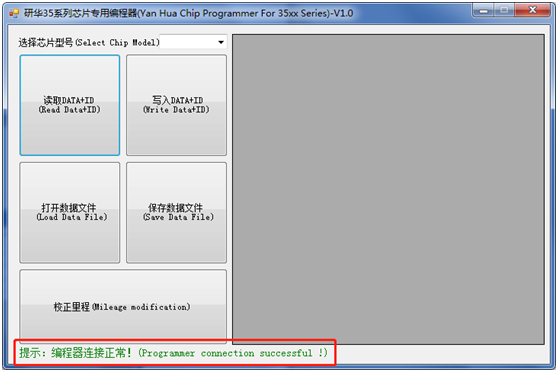
4. Wait for the prompt: Programmer connection successful,Then run it.
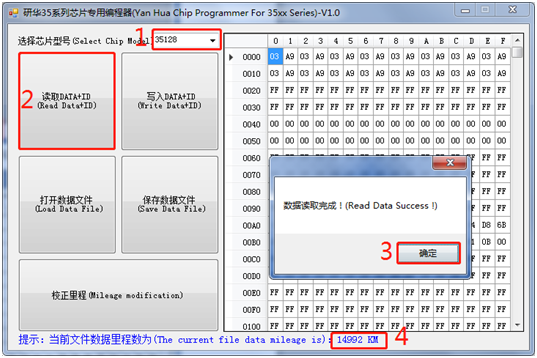
5. Select the EEPROM chip model, i.e 35128 and click "Read DATA+ID", check whether the read mileage is the same as the actual mileage.
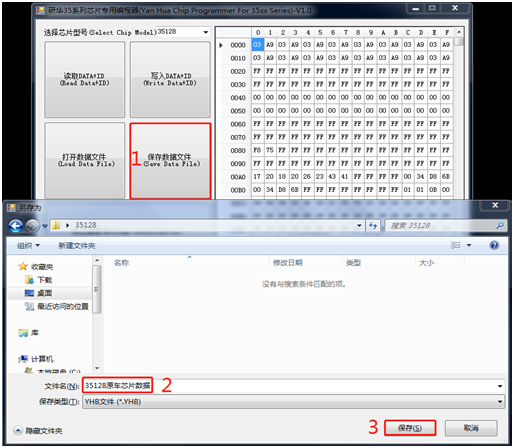
6. Click "Save Data File", Save the original data of original EEPROM to the folder.
7. Clip compatible simulator with chip clamp. Pay attention to the direction. Then connect the solder-free clamp to the programmer, connect the programmer to the PC.
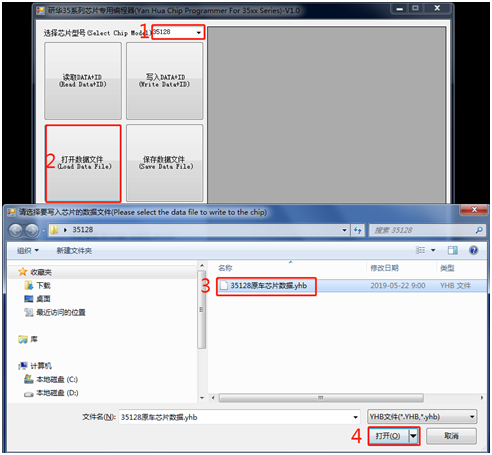
8. Select EEPROM model, click "Load Data File", Select the corresponding data of original EEPROM and load it. Check whether the displayed mileage is the same as the mileage displayed in cluster.
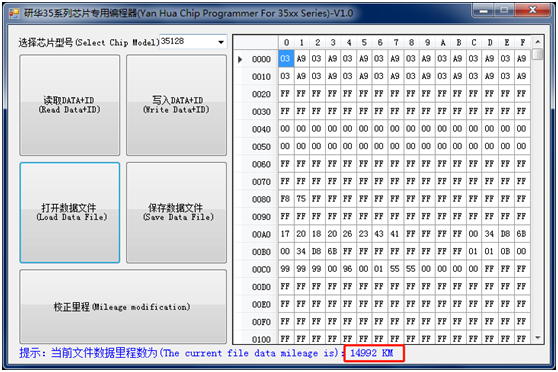
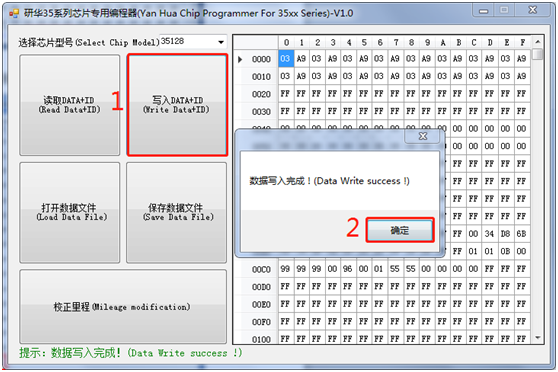
9. Once the mileage is confirmed, click "Write DATA+ID", Write the original data into the Simulator.
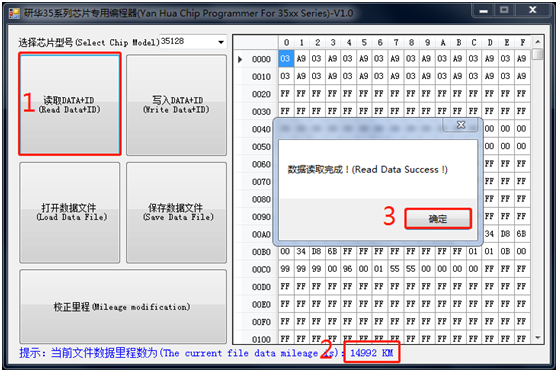
10. Click "Read Data+ID", read the data written into the Simulator, and check the mileage.
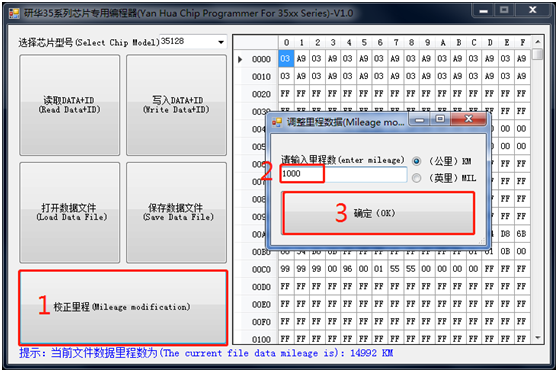
11. After the mileage is confirmed, click "Mileage modification" and input the mileage you want.
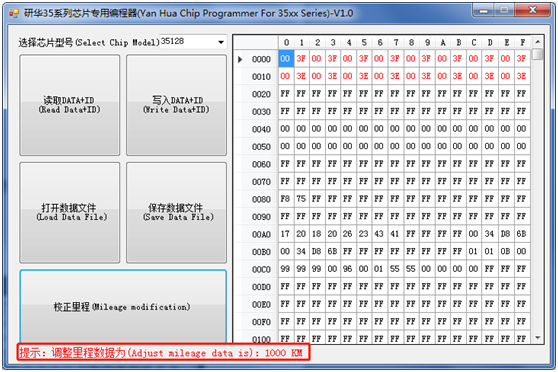
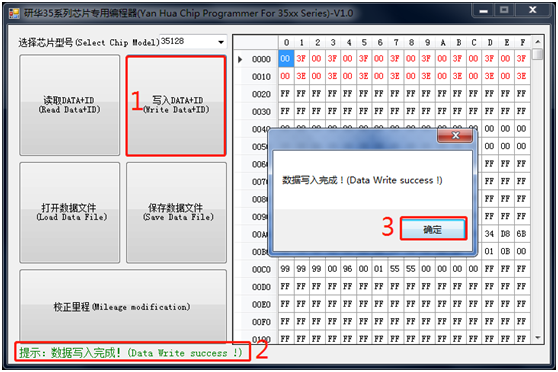
12. After confirm the input mileage is correct, click "Write DATA+ID" to write the modified data into the Simulator.
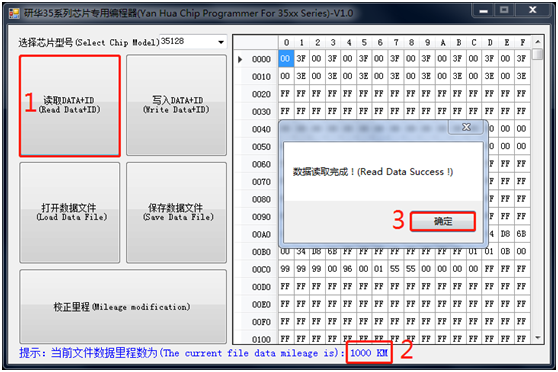
13. After the data is written, click "Read DATA+ID" to check whether the mileage modification is correct
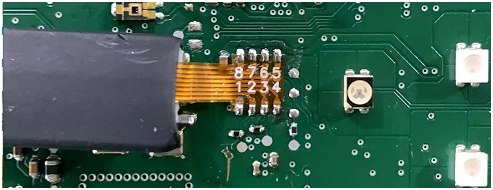
14. If the displayed mileage is the same as what you want, cut off the handle of the Simulator, and solder the Yanhua 35xx Simulator to the original EEPROM position. Pay attention to the EEPROM direction. Install the odometer back to the car to verify whether the mileage modification is successful.
Packing List
1pc X YANHUA Simulator Chip

About Delivery
EU Warehouse Shipping(No Tax): 3-5 working days. We have stocked up hot sale items in EU(Czech) Warehouse ,which is more convenient for you. Free TAX, faster shipping with cheaper price.
Yanwen Express(No Tax): 8-12 working days ,we will prepay the tax,then do not need customers to pay tax for most european counties 【We will send by Yanwen Express by default(for the items not in stock in EU)because of EU high Customs tax. If Customers need the faster DHL shipping method and willing to pay the high tax .Pleasee leave message to us in time after placing the order】
DHL/UPS/Fedex Shipping: 3-5 working days, to help you clearance we will help declare price on the invoice. If address is remote area, customer need pay remote freight or we will ship by Normal Post or Yanwen Express.
Note:
1.All of the items will be shipped to PAYPAL Shipping Address,please confirm your address on PAYPAL before you buy.
2.Your order will be usually shipped out the same or next business days once the payment is made, except on weekends and holidays.
Contact information:
WhatsApp:+86 15223201143