How to install and uninstall the Xhorse BMW BDC2 adapter?
Matched product:
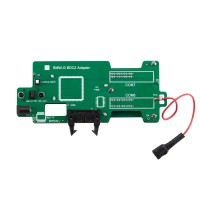
XHORSE XDNPBGGL BMW G Series BDC2 Adapter with Free License Activation for Key Tool Plus, VVDI2 and Key Tool MIDI
- Item No. SK461+XNR-SS533
- Free Shipping
Here we will show how to install and uninstall the Xhorse BMW BDC2 adapter.

Part I: Install Xhorse BMW BDC2 Adapter
Step 1: Align the Adapter
Precisely align the 3 positioning points on the adapter with the 3 corresponding points on the BMW BDC2 module.

Step 2: Press Down
After alignment, firmly press the adapter downward until it seats properly.

Step 3: Secure the Adapter
Locate the locking clip on the adapter and fasten it to ensure a stable connection.


Connect BDC2 adapter with VVDI2 or key tool plus. Take VVDI2 as an example.

Connect the VVDI2 device to the BDC2 module using the BDC2 adapter.
Supply the adapter with 12V power.

Turn on the switch on the BDC2 adapter.
White indicators turn on, allowing you to confirm whether the pins are correctly aligned.

The Power indicator will turn on if the adapter is well connected.

Part II: Uninstall Xhorse BDC2 Adapter
Step 1: Unlock the Adapter
Release the locking clip on the adapter.

Step 2:Prepare the Workspace
Place the module on a flat, stable surface to prevent damage to the adapter or BDC2 module.

Step 3: Press to Release
Use both hands to simultaneously press down on the edges of the BDC2 module.
This will gently push the adapter’s pins upward, disengaging them from the module’s interface.
Step 4: Remove the Adapter
Lift the adapter straight upward in a parallel motion.
Note: The 3 positioning pins ensure smooth removal and prevent bending of the pins.
